Dates in Front Door's own fields, and a brand check
Every date is now typed as month, day and year in Front Door's own fields, and a lint check stops off-brand styling before it ships.
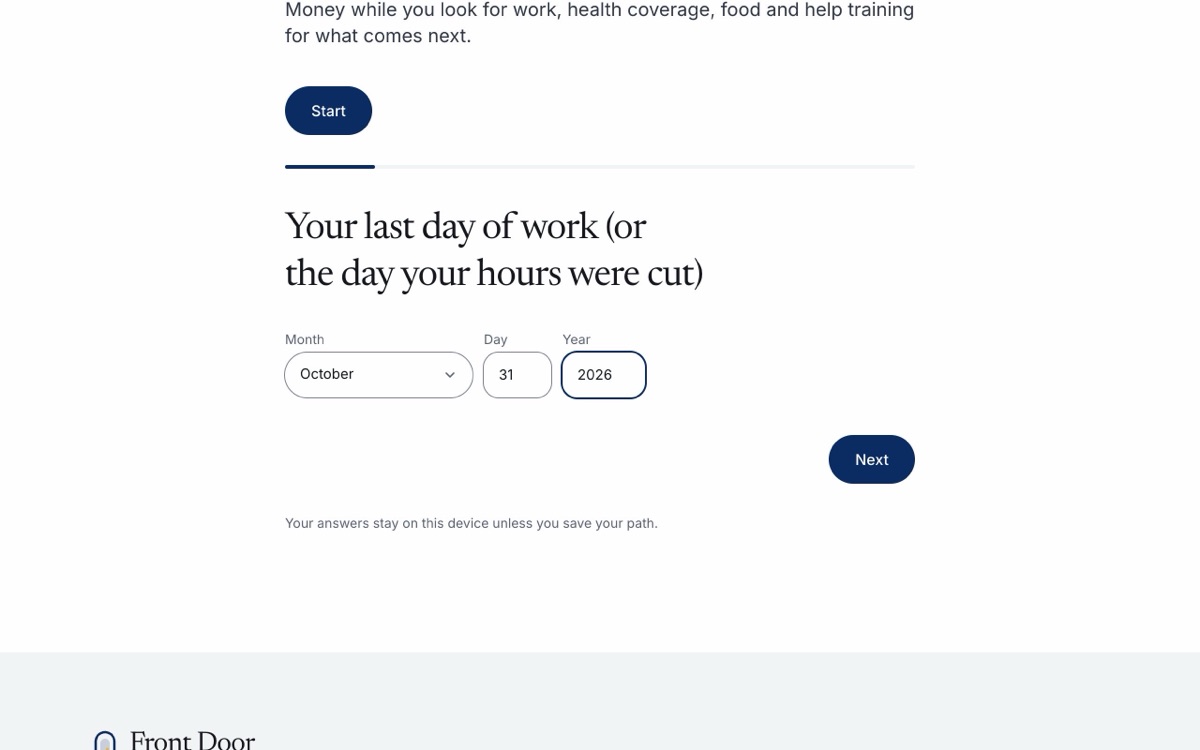
- Dates are typed as month, day and year in three short fields, instead of the browser’s own calendar. The calendar opened in the browser’s colors, often bright blue, and it was slow to page through for a date like a last day of work. This covers the guides (such as Losing a job), renewal dates, reminders, and staff forms for approvals, requests, closures and the people list.
- A date that is not finished or is out of range says what to fix, such as “Pick a date on or before November 7, 2026.” It never replaces a saved date while you are still typing, and a form will not send until the date is whole.
- Opening hours for organizations and agency resources are picked from one list of times in 15 minute steps, such as 9:30 AM, instead of the browser’s clock.
- A design check now runs on every change. It reads Front Door’s colors from its design guide and stops styling that is not on brand: colors outside the palette, italics, uppercase labels, spaced-out letters, pulsing animations, other fonts and faded text. It also stops the browser’s date and time pickers.
- Older styling that does not match yet, such as some shadows, corner shapes and page titles, is listed in one file. The list can only get shorter.
- Small fixes along the way: no more italics in a consent statement or uppercase labels in letter previews, no pulsing loading boxes, and plainer text on map squares.