Share Front Door, and your own referral link
A Share button on program, place and life event pages, and a referral link for every resident.
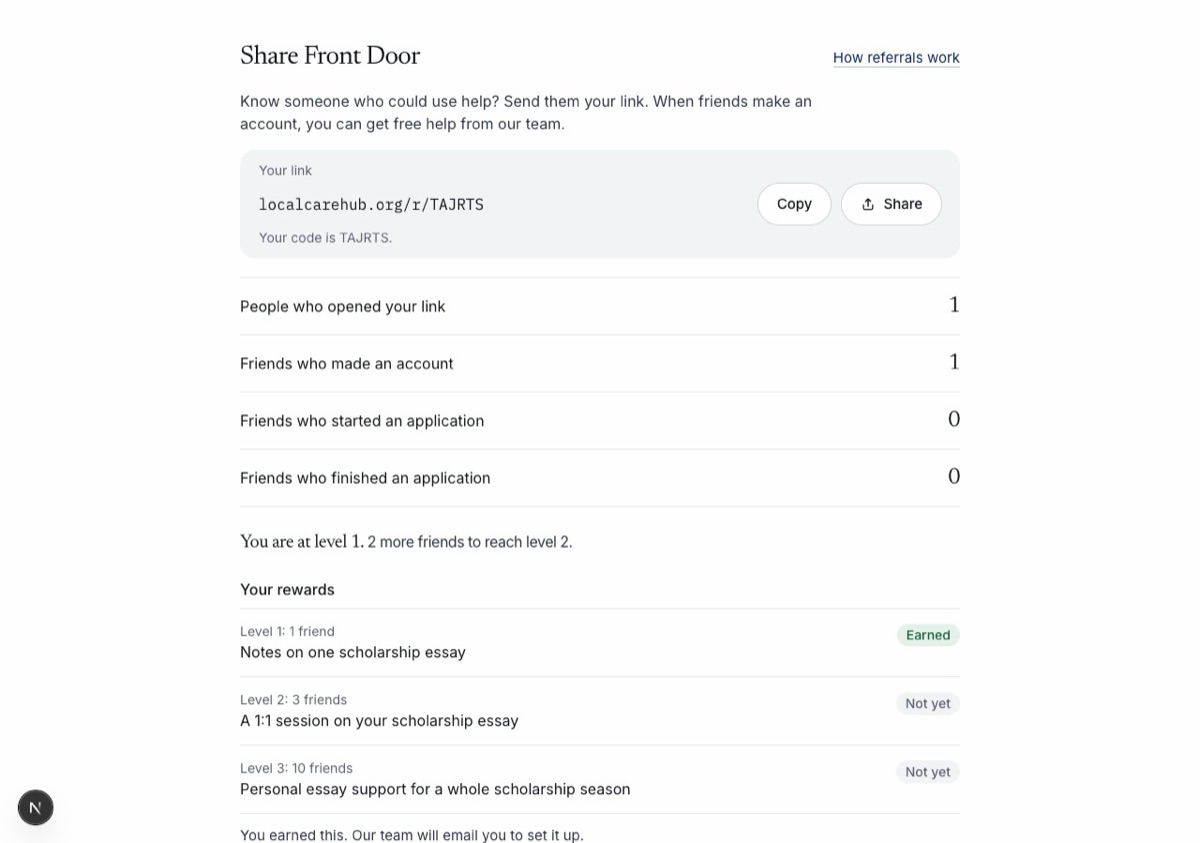
Most people hear about help from someone they know. Now it is easy to send Front Door to them.
- Program, place, life event and home pages have a Share button. It copies the link, or opens a text, WhatsApp or an email with the words filled in. On a phone it can also open the phone’s own share sheet. A QR code is there for a flyer or a front desk.
- A shared link opens the page and nothing else. It never carries your name, what you need or anything in your account. Each page has its own preview card in messages.
- Every signed-in resident has a short link, like localcarehub.org/r/K7M2QX, under Share Front Door on their home page. Pages they share from there carry the same code.
- Your home page counts how many people opened your link, and how many friends made an account, started an application and finished one. It never shows who they are.
- Friends who join count toward levels at 1, 3 and 10 friends. Each level earns free help from the Front Door team: help with a need and case management, help with a scholarship essay, or a resume review. Pick the one you want on your home page. Rewards are never money and never change what you get from any program.
- We check sign-ups that look like the same person, a throwaway email or a rush of accounts. A person on our team looks at each one before it counts. Nobody loses an account over it.
- How referrals work explains the levels, the rewards and the rules. The demo site has a sample leaderboard with made-up groups.
- Making an account now says it takes only an email address, not a Social Security number.