Texts at sign-up, in one line
Signing up for texts is now one optional phone field and one line under the button. Reply STOP or turn texts off on your home page any time.
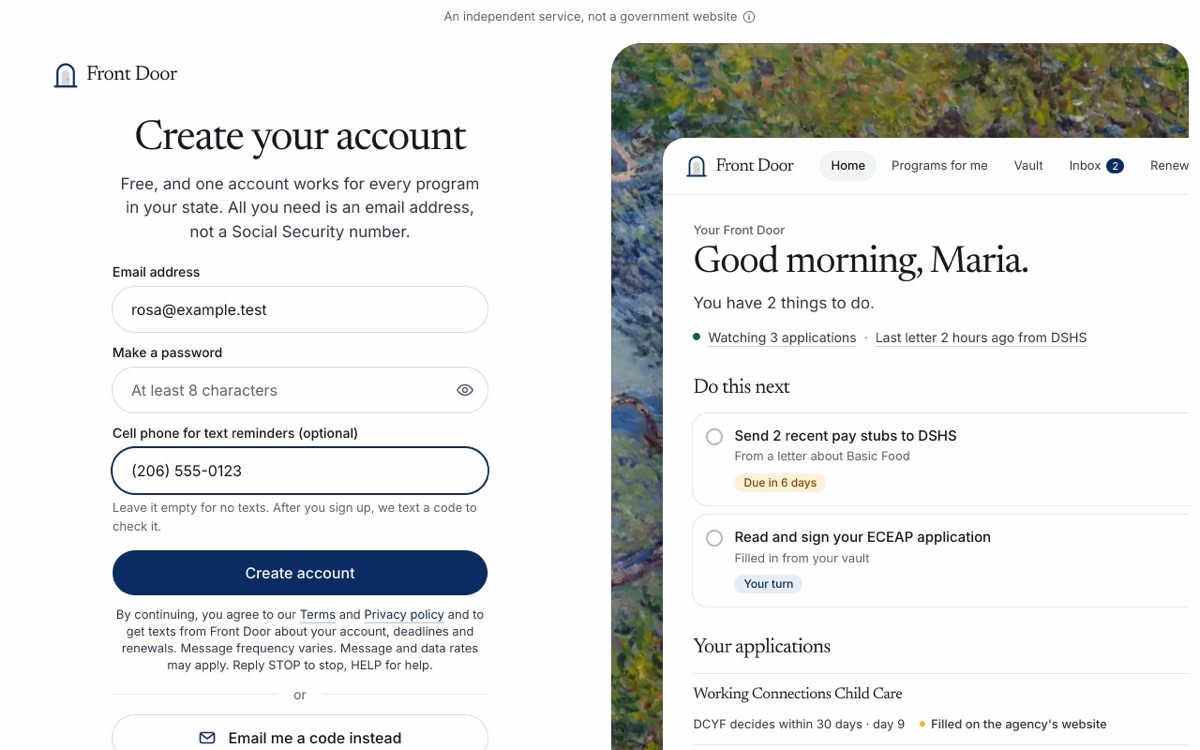
Asking for text reminders used to take six sentences and a switch. Now it takes one line.
- One line under the button. When you make your account, the cell phone field is still optional. Under Create account, one line says what you agree to: our Terms and Privacy policy, and texts from Front Door about your account, deadlines and renewals. It also says that how often depends on your deadlines, that message and data rates may apply, and to reply STOP to stop or HELP for help.
- No box to check. Giving your number and pressing the button is the yes. Leave the number empty and we never text you.
- Same line everywhere. The last step of the welcome and the texts card on your home page use the same words under Text me a code.
- We still check the number. We text a 6-digit code first, and texts start only when you type it back. Then one text says texts are on and how to stop them.
- Two ways to stop. Reply STOP to any text, or press Turn off texts on your home page. Neither one closes your account.
- Texts in the Terms. The Terms now say which texts we send, how often, and how to stop them. The Privacy page names the company that sends our texts. You still need only an email address to make an account, not a Social Security number or an ITIN.
Make your account at localcarehub.org/signin, or read the texts part of the Terms.