Ask about this, right on the page
A small box on program, place and life event pages answers from that page and shows the lines it used.
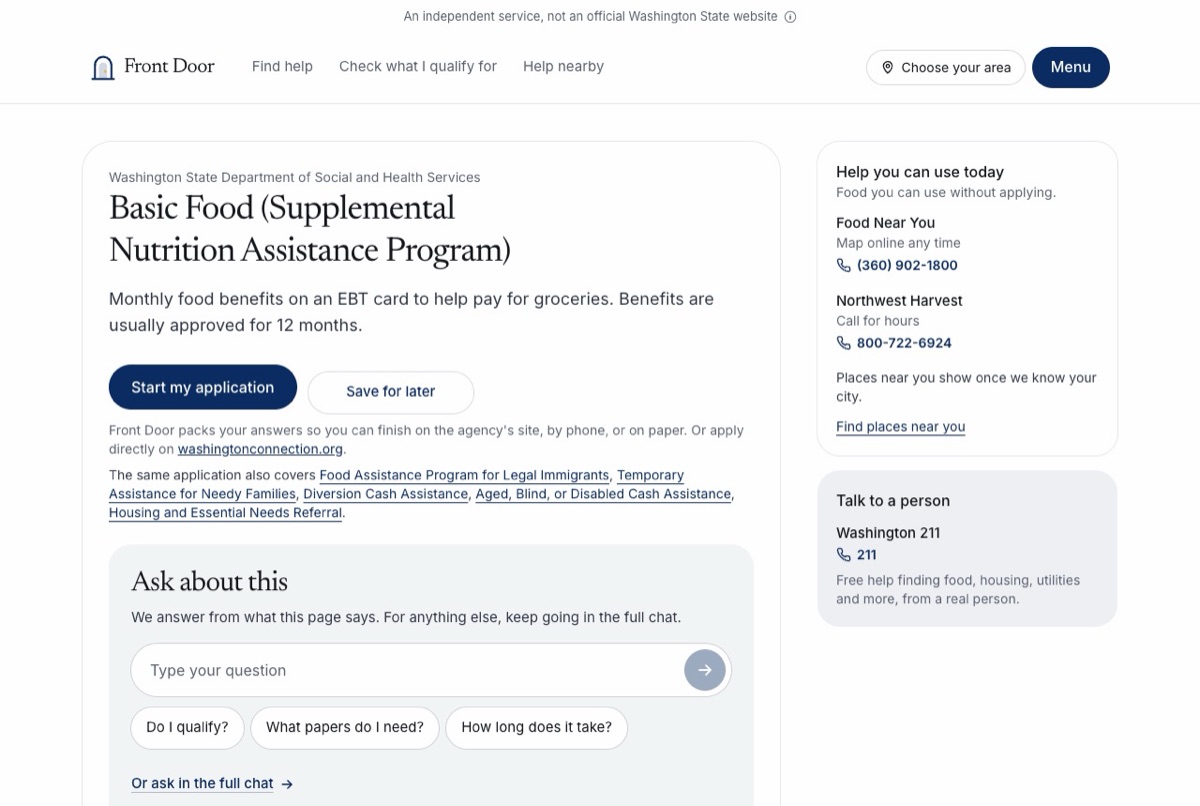
Reading a program page and wondering “What papers do I need?” used to mean opening the full chat and typing it all again. Now you can ask on the page.
- A box called Ask about this sits near the top of every program page, county and city page, life event page and the Working Families Tax Credit page.
- Three questions are written for each page, such as “Do I qualify?”, “What papers do I need?” and “When is the deadline?”. Tap one or type your own.
- Answers come only from that page: the program’s rules, papers, dates, phone numbers and sources, or a place’s offices, hours and food sites. Under each answer, “From this page” shows the lines it used and where each one came from.
- When the page does not say, the answer says so and tells you who to ask. It never makes up an amount, a date or a phone number.
- “Do I qualify?” uses the same rules check as the quick check. It says likely, maybe or unlikely, with the reason, and that the agency decides.
- Words about danger show the crisis lines at once, before anything is sent. Words about an eviction, a shutoff or no food today add a line to call 211.
- Ask in Spanish and the answer comes back in Spanish.
- The box takes a few questions. “Keep going in the full chat” opens the full chat with the page’s name and what you asked, so you do not type it twice.
- Names and phone numbers are taken out before anything is answered, and Social Security, card and bank numbers are never sent. Nothing you type in the box is saved.